Send barcode scan events, row updates, and sheet changes to your WebHook endpoint in real time. When a user scans a barcode or makes a change in Orca Scan, Orca Scan sends an HTTP POST request with JSON data to your server.
Works with: Zapier, Make, and Microsoft Power Automate.
How does the WebHook Out work?
- A user scans a barcode or makes a change in Orca Scan
- Orca Scan sends an HTTP POST request to your WebHook URL
- The request includes the data and event details
- Your server processes the request
What events trigger a WebHook Out?
A request is sent when any of the following changes happen in your sheet:
| Event | Description |
|---|---|
rows:add |
A new row was created |
rows:update |
An existing row was updated |
rows:delete |
A row was deleted |
rows:import:append |
Rows were imported and added to the sheet |
rows:import:replace |
Imported rows replaced the sheet data |
columns:add |
A new column was added |
columns:update |
A column was updated |
columns:clear |
All values in a column were cleared |
columns:delete |
A column was deleted |
sheet:settings:update |
The sheet settings were updated |
sheet:clear |
All rows in the sheet were cleared |
sheet:delete |
The sheet was deleted |
The ___orca_event field included in the payload contains the name of the event.
What does Orca Scan send in each WebHook?
Each request includes a JSON payload in the request body, containing the row data and Orca system fields. Request headers are also included to help identify and verify the request.
JSON payload
{
	// row data
	"Barcode": "WS2323",
	"Name": "Wooden Socks",
	"Location": "52.2019723, 0.1168256",
	"Date": "2020.03.16 16:02:45",

	// system fields
	"___orca_event": "rows:add",
	"___orca_sheet_name": "My Sheet",
	"___orca_user_email": "name@email.com",
	"___orca_row_id": "5cf5c1efc66a9681047a0f3d"
}
Orca system fields
| Parameter | Description |
|---|---|
___orca_event |
Event that triggered the request |
___orca_sheet_name |
Name of the sheet that was updated |
___orca_user_email |
Email address of the user who made the change (HTTPS only) |
___orca_row_id |
The unique ID of the row |
HTTP headers
| Parameter | Description |
|---|---|
orca-sheet-id |
Unique ID of the Orca Scan sheet |
orca-timestamp |
Timestamp of the request in UNIX epoch format |
orca-sheet-name |
Name of the sheet |
orca-user-email |
Email of user who triggered the request (requires HTTPS) |
orca-secret |
Sheet assigned secret (check this to verify request) |
orca-request-type |
webhook-out |
How to set up a WebHook Out URL
- Log in to the Orca Scan web app
- Select the sheet you want to use
- Click Integrations in the toolbar

- Click Events API and enter your WebHook Out URL
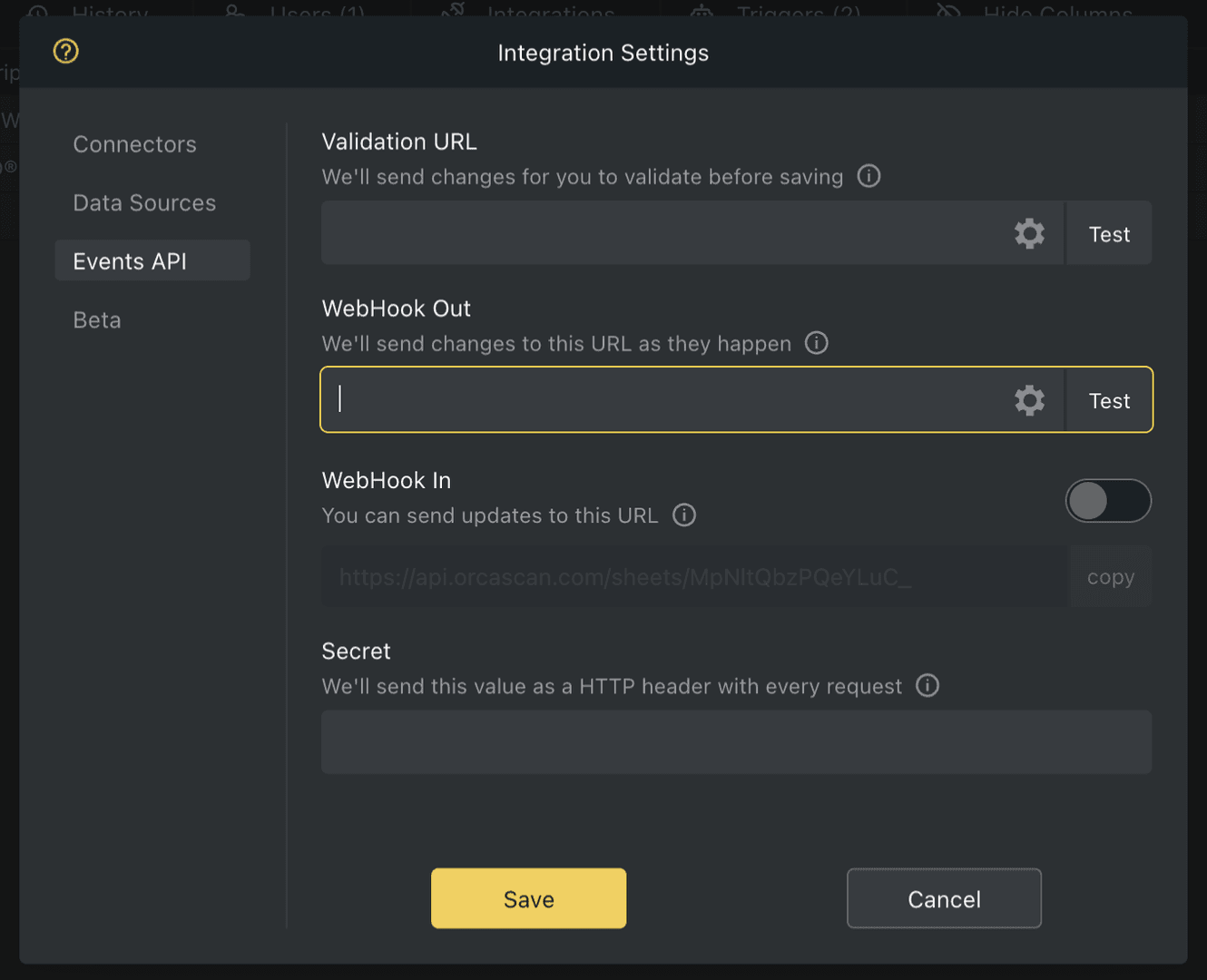
- Click Test to confirm your WebHook URL is accessible
- Save the changes
That’s it. Now scan a barcode → enter some data → tap save.
How to create a WebHook endpoint
You can create a WebHook endpoint using a few lines of code:
const express = require('express');
const app = express();

app.use(express.json());

app.post('/orca-webhook-out', function(request, response){
    data = request.body;

    // dubug purpose: show in console raw data received
    console.log("Request received: \n"+JSON.stringify(data, null, 2));

    // get the name of the event that triggered this request
    const eventName = data.___orca_event;

    // get the name of the sheet this action impacts
    const sheetName = data.___orca_sheet_name;

    // get the email of the user who preformed the action (empty if not HTTPS)
    const userEmail = data.___orca_user_email;

    // orca system fields start with ___
    // access the value of fields using the field name
    // example: data.Name, data.Barcode, data.Location

    switch (eventName) {

        case "rows:add": {
            // TODO: do something when a row has been added
				} break;

        case "rows:update": {
            // TODO: do something when a row has been updated
				} break;

        case "rows:delete": {
            // TODO: do something when a row has been deleted
				} break;

        case "test": {
            // TODO: do something when the user in the web app hits the test button
				} break;
      }

    response.sendStatus(200);
});

app.listen(3000, () => console.log('Example app is listening on port 3000.'));
[HttpPost]
[Consumes("application/json")]
public async Task<OkResult> WebHookReceiver()
{
    // WebHooks send data as a HTTP POST, so extract JSON string from Request.Body
    using (StreamReader reader = new StreamReader(Request.Body, Encoding.UTF8))
    {
        // get the raw JSON string
        string json = await reader.ReadToEndAsync();

        // convert into .net object
        dynamic data = JObject.Parse(json);

        // get the name of the event that triggered this request
        string eventName = (data.___orca_event != null) ? (string)data.___orca_event : "";

        // get the name of the sheet this action impacts
        string sheetName = (data.___orca_sheet_name != null) ? (string)data.___orca_sheet_name : "";

        // get the email of the user who preformed the action (empty if not HTTPS)
        string userEmail = (data.___orca_user_email != null) ? (string)data.___orca_user_email : "";

        // orca system fields start with ___
        // access the value of fields using the field name
        // example: data.Name, data.Barcode, data.Location

        // decide on what action to take based on orca action
        switch (eventName) {

            case "rows:add": {
                // TODO: do something when a row has been added
            } break;

            case "rows:update": {
                // TODO: do something when a row has been updated
            } break;

            case "rows:delete": {
                // TODO: do something when a row has been deleted
            } break;

            case "test": {
                // TODO: do something when the user in the web app hits the test button
            } break;
        }
    }

    // always return a 200 (ok)
    return new OkResult();
}
type OrcaBarcode struct {
	Barcode string
	Date string
	Description string
	Example string
	Name string
	Quantity int
	___autofocus string
	___autoselect string
	___lastSchemaVersion string
	___orca_event string
	___orca_row_id string
	___orca_sheet_name string
	___orca_user_email string
	___owner string
	___schemaVersion string
}

func webHookOutHandler(w http.ResponseWriter, r *http.Request) {
	// Read body
	body, err := ioutil.ReadAll(r.Body)
	defer r.Body.Close()
	if err != nil {
		fmt.Println(err)
		http.Error(w, err.Error(), 500)
		return
	}

	// Parse JSON data
	var barcode OrcaBarcode
	jsonErr := json.Unmarshal([]byte(body), &barcode)
	if jsonErr != nil {
		fmt.Println(jsonErr)
		http.Error(w, jsonErr.Error(), 500)
		return
	}

    // dubug purpose: show in console raw data received
	fmt.Println(barcode)

	// get the name of the event that triggered this request
	eventName := barcode.___orca_event

	// get the name of the sheet this action impacts
	sheetName := barcode.___orca_sheet_name
	fmt.Println(sheetName)

	// get the email of the user who preformed the action (empty if not HTTPS)
	userEmail := barcode.___orca_user_email
	fmt.Println(userEmail)

  // orca system fields start with ___
  // access the value of fields using the field name
  // example: data["Name"], data["Barcode"], data["Location"]

	switch eventName {

    case "rows:add":
        // TODO: do something when a row has been added

    case "rows:update":
        // TODO: do something when a row has been updated

    case "rows:delete":
        // TODO: do something when a row has been deleted

		case "test":
        // TODO: do something when the user in the web app hits the test button
	}

	w.WriteHeader(http.StatusOK)
	w.Write([]byte("OK"))
	return
}
@app.route('/orca-webhook-out', methods=['POST'])
def webhook_out():
    if request.method == 'POST':
        data = request.get_json()

        # get the name of the event that triggered this request
        eventName = data["___orca_event"]

        # get the name of the sheet this action impacts
        sheet_name = data["___orca_sheet_name"]

        # get the email of the user who preformed the action (empty if not HTTPS)
        user_email = data["___orca_user_email"]

        # orca system fields start with ___
        # access the value of fields using the field name
        # example: data["Name"], data["Barcode"], data["Location"]

        if eventName == "rows:add":
            # TODO: do something when a row has been added
            pass
        elif action == "rows:update":
            # TODO: do something when a row has been updated
            pass
        elif action == "rows:delete":
            # TODO: do something when a row has been deleted
            pass
        elif action == "test":
            # TODO: do something when the user in the web app hits the test button
            pass

    # always return a 200 (ok)
    return "ok"
if (preg_match('/orca-webhook-out$/', $_SERVER["REQUEST_URI"])){
    if ($_SERVER['REQUEST_METHOD'] === 'POST') {
        $data = json_decode(file_get_contents('php://input'), true);

         // get the name of the event that triggered this request
        $eventName = $data["___orca_event"];

        // get the name of the sheet this action impacts
        $sheetName = $data["___orca_sheet_name"];

        // get the email of the user who preformed the action (empty if not HTTPS)
        $userEmail = $data["___orca_user_email"];

        // orca system fields start with ___
        // access the value of fields using the field name
        // example: data.Name, data.Barcode, data.Location

        switch ($eventName) {

            case "rows:add":
                // TODO: do something when a row has been added
                break;

            case "rows:update":
                // TODO: do something when a row has been updated
                break;

            case "rows:delete":
                // TODO: do something when a row has been deleted
                break;

            case "test":
                // TODO: do something when the user in the web app hits the test button
                break;
        }

        return 'ok';
    }
}
@RequestMapping(
    value = "/orca-webhook-out",
    method = RequestMethod.POST)
String index(@RequestBody Map<String, Object> payload)  throws Exception {

    // dubug purpose: show in console raw data received
    System.out.println(payload);

    // get the name of the event that triggered this request (add, update, delete, test)
    String eventName = payload.get("___orca_event").toString();

    // get the name of the sheet this action impacts
    String sheetName = payload.get("___orca_sheet_name").toString();

    // get the email of the user who preformed the action (empty if not HTTPS)
    String userEmail = payload.get("___orca_user_email").toString();

    // orca system fields start with ___
    // access the value of fields using the field name
    // example: data.Name, data.Barcode, data.Location

    switch (eventName) {

        case "rows:add":
            // TODO: do something when a row has been added
            break;

        case "rows:update":
            // TODO: do something when a row has been updated
            break;

        case "rows:delete":
            // TODO: do something when a row has been deleted
            break;

        case "test":
            // TODO: do something when the user in the web app hits the test button
            break;
    }

    return "ok";
}
Full working examples for each language are available on GitHub.
WebHook Out FAQs
How do I connect my development machine?
Expose your local service to the internet so Orca Scan can send WebHook requests to it. The easiest way is using localtunnel:
# expose port 3000 to the internet (change if needed)
npx localtunnel --port 3000
Use the temporary HTTPS URL as your WebHook Out URL during development, then replace it with a permanent public URL once deployed.
What payload is sent when a row is added?
{
  "Barcode": "1234",
  "Name": "",
  "Location": "",
  "Date": "",
  "___orca_action": "add",
  "___orca_event": "rows:add",
  "___orca_sheet_name": "My Sheet",
  "___orca_user_email": "name@email.com",
  "___orca_row_id": "69d16a8e91d205e52aeb76f2"
}
What payload is sent when a row is updated?
{
  "Barcode": "1234",
  "Name": "My cool product",
  "Location": "",
  "Date": "",
  "___orca_action": "update",
  "___orca_event": "rows:update",
  "___orca_sheet_name": "My Sheet",
  "___orca_user_email": "name@email.com",
  "___orca_row_id": "69d16a8e91d205e52aeb76f2"
}
What payload is sent when a row is deleted?
{
  "Barcode": "1234",
  "Name": "My cool product",
  "Location": "",
  "Date": "",
  "___orca_action": "delete",
  "___orca_event": "rows:delete",
  "___orca_sheet_name": "My Sheet",
  "___orca_user_email": "name@email.com",
  "___orca_row_id": "69d16a8e91d205e52aeb76f2"
}
What payload is sent when data is imported?
{
  "___orca_event": "rows:import:append",
  // ^ changes to `rows:import:replace` when sheet data is replaced
  "___orca_sheet_name": "My Sheet",
  "___orca_user_email": "name@email.com",
  "rows": [
    {
      "Barcode": "WS2323",
      "Name": "Wooden Socks",
      "Location": "52.2019723, 0.1168256",
      "Date": "2020-03-16T16:02:45.000Z",
      "___orca_row_id": "69d1650891d205e52aeb76c7"
    },
    {
      "Barcode": "IC4490",
      "Name": "Invisible Cape",
      "Location": "48.856613, 2.352222",
      "Date": "2020-03-16T16:08:33.000Z",
      "___orca_row_id": "69d1650891d205e52aeb76c8"
    },
    {
      "Barcode": "DD1010",
      "Name": "Dragon Detector",
      "Location": "37.774929, -122.419418",
      "Date": "2020-03-16T16:31:58.000Z",
      "___orca_row_id": "69d1650891d205e52aeb76c9"
    }
  ]
}
What payload is sent when a column is added?
{
  "___orca_event": "columns:add",
  "___orca_sheet_name": "My Sheet",
  "___orca_user_email": "name@email.com",
  "data": {
    "addedColumns": [
      "photoOfProduct"
    ]
  }
}
What payload is sent when a column is updated?
{
  "___orca_event": "columns:update",
  "___orca_sheet_name": "My Sheet",
  "___orca_user_email": "name@email.com",
  "data": {
    "updatedColumns": [
      "name"
    ]
  }
}
What payload is sent when a column is deleted?
{
  "___orca_event": "columns:delete",
  "___orca_sheet_name": "My Sheet",
  "___orca_user_email": "name@email.com",
  "data": {
    "deletedColumns": [
      "photoOfProduct"
    ]
  }
}
What payload is sent when a column is cleared?
{
  "___orca_event": "columns:clear",
  "___orca_sheet_name": "My Sheet",
  "___orca_user_email": "name@email.com",
  "___orca_column_name": "Name"
}
What payload is sent when a sheet is cleared?
{
  "___orca_event": "sheet:clear",
  "___orca_sheet_name": "My Sheet",
  "___orca_user_email": "name@email.com"
}
What payload is sent when sheet settings are changed?
{
  "___orca_event": "sheet:settings:update",
  "___orca_sheet_name": "My Sheet",
  "___orca_user_email": "name@email.com",
  "data": {
    "timeZone": "(GMT+00:00) Dublin, Edinburgh, Lisbon, London",
    "dateTimeFormat": "(DD/MM/YYYY HH:mm:ss) 01/12/2019 13:30:00",
    "allowPublicExport": false,
    "publicExportToken": "70EWGH9y-2qbbqE2",
    "allowPublicEntry": false,
    "webHookUrl": "https://sour-squids-sing.loca.lt/orca-webhook-out",
    "allowWebHookIn": false,
    "webHookInToken": "bzHToZvbZTwWMffj",
    "secret": "shhh",
    "colWidths": {
      "barcode": 154,
      "name": 182,
      "location": 182
    },
    "barcodeLocked": false,
    "barcodeType": "QR Code",
    "barcodeValueField": "barcode",
    "barcodeFontSize": "Fit",
    "barcodeDownloadFormat": "SVG",
    "selectedLabelId": "66fa79b28fad178d30393632"
  }
}
What payload is sent when a sheet is deleted?
{
  "___orca_event": "sheet:delete",
  "___orca_sheet_name": "My Sheet",
  "___orca_user_email": "name@email.com"
}
What payload is sent when I click the Test button?
{
  "Barcode": "orca-scan-test",
  "Name": "Gorgeous Fresh Keyboard",
  "Location": "52.2034823, 0.1235817",
  "Date": "2026-04-04T18:25:17.062Z",
  "___orca_action": "test",
  "___orca_event": "test",
  "___orca_sheet_name": "My Sheet",
  "___orca_user_email": "name@email.com",
  "___orca_row_id": "69d1578d348a01a0b5b676cc"
}
How do I secure my WebHook URL?
Add a secret to your sheet and validate it on every request. The secret is sent as an HTTP header, or can be passed as a query parameter if required.
What HTTPS certificates does WebHook Out trust?
Orca Scan only trust valid HTTPS connections with certificates from recognised authorities (e.g., Let’s Encrypt, DigiCert, GlobalSign, Sectigo).
Need help setting up a WebHook Out URL?
We’re happy to help, chat with us live or book a free implementation call.