Your one-stop platform for all things barcodes
Designed to grow with you, start free and upgrade anytime.
View users in my account
Enterprise
A plan tailored to your organisation
$500
/moStarter
All the essentials for growing teams
$39
/moBusiness
Advanced features for bigger teams
$79
/moEnterprise
A plan tailored to your organisation
$400
/moTrusted by over 50,000 organisations in over 165 countries


Compare Plans
At Orca Scan, we have a plan for every need.
Enterprise
Get Enterprise Plan| Users A user is defined as one unique email account and each member needs one to share sheets and track user activity. Read our guide | 1 | 2 +$15 per extra user | 5 +$25 per extra user | Custom +$50 per extra user |
| Sheets A sheet is like a custom database you design by adding/removing columns. When users are added to a sheet, it appears in the mobile app and columns become data entry fields. Read our guide | 1 | 5 +$5 per extra sheet | 10 +$5 per extra sheet | Custom +$5 per extra sheet |
| Rows (per sheet) Each row represents one unique item such as a barcode, SKU, or serial number. Read our guide | 100 | 2,000 +$5 per 2,000 extra rows | 10,000 +$10 per 5,000 extra rows | Custom +$15 per 10,000 extra rows |
| Revision History Every time a change or update is made, an individual record is timestamped with the user's name for you to trace all activity. Read our guide | 7 days | 30 days | 90 days | Custom |
| Orca Intelligence Scan a barcode and instantly retrieve any associated information. If data is available, you'll be able to review it and choose exactly what details you want to keep. | ‐ | ‐ | ✓ | ✓ |
| Multiple Admins Give trusted members of your team more access to a sheet by making them an Admin. Admins can add/remove users, change permissions, and manage the sheet. Read our guide | ‐ | ‐ | ✓ | ✓ |
| Offline Access Access your sheets and scan barcodes even when you're offline. Changes will sync automatically once you're back online. | ✓ | ✓ | ✓ | ✓ |
| Custom Fields Add unlimited custom fields such as GPS location, signature, drop-down lists, etc. Read our guide | ✓ | ✓ | ✓ | ✓ |
| Label Generator Generate and print barcode labels and QR codes directly from the web or mobile application. Read our guide | ✓ | ✓ | ✓ | ✓ |
| GPS Location Capture the GPS location of your assets for tracking and auditing purposes. Read our guide | ‐ | ✓ | ✓ | ✓ |
| Formulas Create custom formulas to calculate values based on your data. Read our guide | ‐ | ‐ | ✓ | ✓ |
| Units of Measure Define custom units of measure for your number fields. Read our guide | ‐ | ‐ | ✓ | ✓ |
| Photos Capture photos of your assets for quality/inspection purposes. Read our guide | ‐ | ‐ | ✓ | ✓ |
| Attachments Attach files to your assets for reference or documentation purposes. Read our guide | ‐ | ‐ | ✓ | ✓ |
| Signatures Capture signatures for approvals, deliveries, or any other purpose. Read our guide | ‐ | ‐ | ✓ | ✓ |
| Currencies Manage multiple currencies for your transactions and reports. Read our guide | ‐ | ‐ | ✓ | ✓ |
| Barcode Label Designer Design custom barcode labels for your assets. Read our guide | ✓ | ✓ | ✓ | ✓ |
| Asset Maps View the location of all your assets on a map, with a detailed history of each item's journey. Read our guide | ‐ | ✓ | ✓ | ✓ |
| Triggers Add custom logic to your sheets to show/hide fields, set up notifications, or break barcodes into multiple fields. Read our guide | ‐ | ‐ | ✓ | ✓ |
| Data Sources Set any sheet as the Data Source for another (e.g., master product list). Read our guide | ‐ | ‐ | ✓ | ✓ |
| Views (per sheet) Merge multiple sheets into one readonly view (e.g., inventory from multiple locations). Read our guide | ‐ | ‐ | ✓ | ✓ |
| QR Forms Print a QR code for any sheet to let users enter data using a camera phone, no app required. Read our guide | ‐ | ‐ | ✓ | ✓ |
| Item Link Give every item a permanent QR code and optional web address. Scan it with any phone to view or update its data. Read our guide | ‐ | ‐ | ✓ | ✓ |
| Custom Branding Create a seamless brand experience by incorporating your logo, colour palette, and other visual elements. Read our guide | ‐ | ‐ | ✓ | ✓ |
| Custom Domain Use your own custom domain name for a more professional appearance. Read our guide | ‐ | ‐ | ‐ | ✓ |
| Automatic Backups Saves your sheets before major changes so you can recover anytime. Read our guide | ‐ | ‐ | ‐ | ✓ |
| Microsoft Excel Send barcode scans directly into Microsoft Excel in real-time using a unique URL assigned to each sheet. Read our guide | ‐ | ‐ | ✓ | ✓ |
| Google Sheets Send barcode scans directly into Google Sheets in real-time using a unique URL assigned to each sheet. Read our guide | ‐ | ‐ | ✓ | ✓ |
| Zapier Scan barcodes into 5,000 apps using Zapier. Read our guide | ‐ | ‐ | ✓ | ✓ |
| Make / Integromat Trigger events in over 1,000 apps using make.com. Read our guide | ‐ | ‐ | ✓ | ✓ |
| Microsoft Power BI Connect any sheet directly to Microsoft Power BI to build dashboards, with real-time access to your data. Read our guide | ‐ | ‐ | ✓ | ✓ |
| Tableau Connect any sheet directly to Tableau to build dashboards, with real-time access to your data. Read our guide | ‐ | ‐ | ✓ | ✓ |
| Data Studio Connect any sheet directly to Data Studio to build dashboards, with real-time access to your data. Read our guide | ‐ | ‐ | ✓ | ✓ |
| Grafana Connect any sheet directly to Grafana to build dashboards, with real-time access to your data. Read our guide | ‐ | ‐ | ✓ | ✓ |
| Claude Connect any sheet directly to Claude to ask questions and get insights from your data. Read our guide | ‐ | ‐ | ✓ | ✓ |
| ChatGPT Connect any sheet directly to ChatGPT to ask questions and get insights from your data. Read our guide | ‐ | ‐ | ✓ | ✓ |
 MariaDB MariaDB Query MariaDB on scan (optional write back) Read our guide | ‐ | ‐ | ||
 Microsoft SQL Server Microsoft SQL Server Query MSSQL on scan (optional write back) Read our guide | ‐ | ‐ | ||
 MySQL MySQL Query MySQL on scan (optional write back) Read our guide | ‐ | ‐ | ||
 Oracle Database Oracle Database Query Oracle on scan (optional write back) Read our guide | ‐ | ‐ | ||
 PostgreSQL PostgreSQL Query Postgres on scan (optional write back) Read our guide | ‐ | ‐ | ||
 SAP S/4HANA SAP S/4HANA Look up and update SAP S/4HANA data when a barcode is scanned | ‐ | ‐ |
| Barcode Image API Pull data from any sheet in HTML, CSV, XML, or JSON format using a simple HTTP GET request. Read our guide | ✓ | ✓ | ✓ | ✓ |
| Barcode Parser API Parse barcode data from any sheet in HTML, CSV, XML, or JSON format using a simple HTTP GET request. Read our guide | ✓ | ✓ | ✓ | ✓ |
| MCP Server Connect any sheet to AI assistants like Claude and ChatGPT using a Model Context Protocol (MCP) server. Read our guide | ‐ | ‐ | ✓ | ✓ |
| Live Data URL Pull data from any sheet in HTML, CSV, XML, or JSON format using a simple HTTP GET request. Read our guide | ‐ | ‐ | ✓ | ✓ |
| Lookup URL Pull data from your system each time a barcode is scanned. Read our guide | ‐ | ‐ | ✓ | ✓ |
| Validation URL Inspect, approve, or reject every barcode scan before it's saved to your sheet. Read our guide | ‐ | ‐ | ✓ | ✓ |
| WebHook In Send an HTTP POST to your sheet to add, update, or delete any row. Read our guide | ‐ | ‐ | ✓ | ✓ |
| WebHook Out Keep your system in sync by receiving an HTTP POST every time a row is added, updated, or deleted. Read our guide | ‐ | ‐ | ✓ | ✓ |
| Rest API Connect Orca Scan to your system using an industry standard RESTful API. Read our guide | ‐ | ‐ | ✓ | ✓ |
| Mobile Scanners Use any hardware barcode scanner to scan barcodes into Orca Scan. Read our guide | ✓ | ✓ | ✓ | ✓ |
| Bluetooth Scanners Use any bluetooth barcode scanner to scan barcodes into Orca Scan. Read our guide | ✓ | ✓ | ✓ | ✓ |
| USB Scanners Use any USB barcode scanner to scan barcodes into Orca Scan. Read our guide | ✓ | ✓ | ✓ | ✓ |
| Enterprise Scanners Use any enterprise barcode scanner to scan barcodes into Orca Scan. Read our guide | ✓ | ✓ | ✓ | ✓ |
| GDPR Orca Scan is fully compliant with the General Data Protection Regulation (GDPR) to ensure the privacy and protection of personal data. | ✓ | ✓ | ✓ | ✓ |
| Cyber Essentials Plus Orca Scan is certified under the Cyber Essentials Plus scheme, demonstrating our commitment to cybersecurity. | ✓ | ✓ | ✓ | ✓ |
| Service Level Agreement (SLA) Orca Scan offers a Service Level Agreement (SLA) to ensure reliable and consistent service. | ‐ | ‐ | ‐ | |
| Security Review Orca Scan undergoes regular security reviews to ensure the highest level of protection for your data. | ‐ | ‐ | ‐ |
| Live Chat & Email Support Get assistance with issues and questions via live chat or email. Read our guide | ✓ | ✓ | ✓ | ✓ |
| Help Docs & Videos Access our extensive library of guides, tutorials, and videos to assist you. Read our guide | ✓ | ✓ | ✓ | ✓ |
| Priority Support Get faster responses for support requests with priority support. Read our guide | ‐ | ‐ | ‐ | ✓ |
| Dedicated Success Manager Access a dedicated support manager for personalized assistance. Read our guide | ‐ | ‐ | ‐ | ✓ |
| Payment by Invoice Make payments by invoice rather than using a credit card. Read our guide | ‐ | ‐ | ‐ | ✓ |
FAQ
Can’t find what you need? Ask the team
What is a user?
A user is defined as one personalised email address (you@yourcompany.com) and each team member needs one.
This email address is used to share sheets between users, and track activity.

What is a sheet?
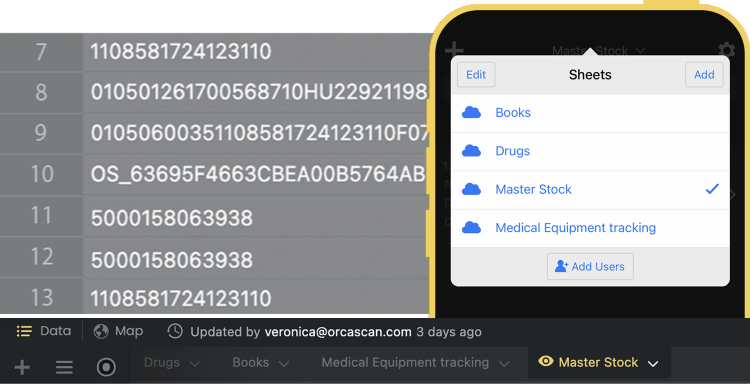
You can think of a sheet as a single tab in a spreadsheet; however, in Orca Scan each sheet acts as a real-time database from which the mobile app can push and pull data for multiple users. Learn how sheets work in the web app.
Each column in your sheet becomes a data entry field in the mobile app, simply add/remove columns to capture the data you need.
What is a row?
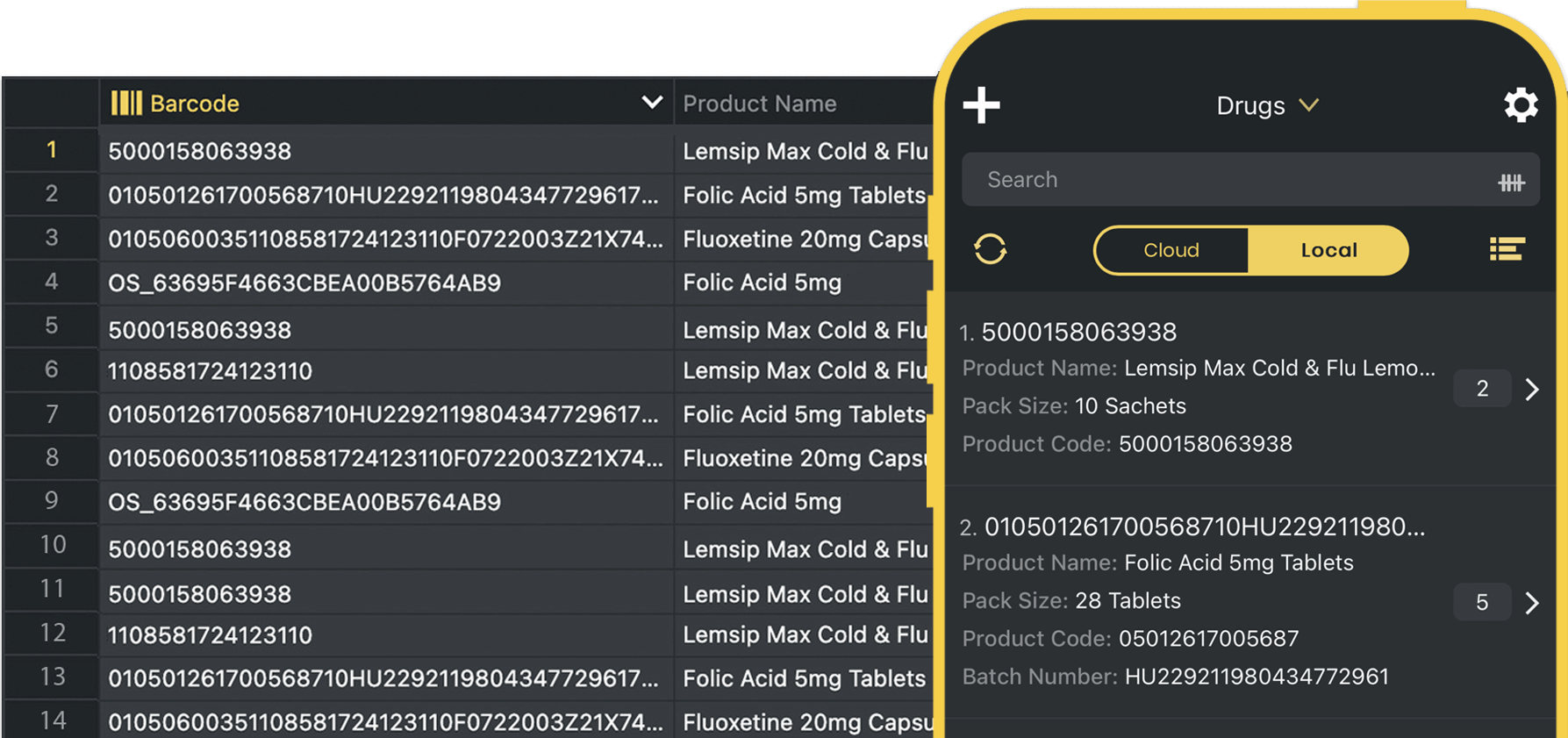
A row is just like a row in a spreadsheet. In Orca Scan, each row represents one unique item such as a barcode, SKU or serial number.
When you scan a barcode using the mobile app, it will search your sheet for a matching row, or create one if does not exist.
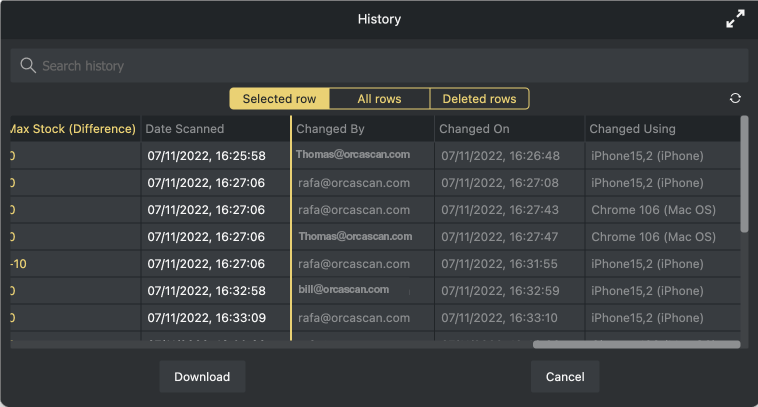
What is a revision history?
Any advanced tracking system should tell you when an activity happened, what the activity was and who carried it out.
Orca Scan logs this information for you automatically, simply select the item and click view history.
Can I use Orca Scan for free?
Yes, our free tier is completely free to use indefinitely. It has up to 50 rows and one sheet, more than enough for most small projects.
How is Free different to Paid?
The main difference is the features available to the paid plans. For example, our free tier has one cloud sheet with a 100 row cap, whereas our business plan can have up to 10 sheets with a 10,000 row cap.
What if I pass my storage limit?
We will store any additional items that you scan or import, but they will go dormant so they can’t be exported or accessed on mobile. You can still read, edit, and organise all the items below the row limit.
Can I pay monthly?
Yes, Orca Scan is a pay-as-you-go service. You can pay monthly and cancel anytime. If you decide to cancel mid-month, you will be billed for the remainder of that month.
Do you offer support?
Yes. We’re keen to help you get the most out of the system, chat with us live or via email if you have any queries. You can also find user guides and videos in our guides section.
Do you support non-profits?
Yes, we offer a 50% discount on our Business plan for registered non-profit organisations when paid annually.